


Every Linux user has done the three-step dance at least once. You want to swap two files, so you move the first one to a temporary name, move the second one into its place, and then move the temporary file back.
Ever felt that this is a bit... clumsy? And for a moment, one of your files simply doesn't exist. That doesn't feel right!
Since version 9.5, GNU coreutils has a better way: mv --exchange.
In this article, I'll show you what it does, how to check if your system has it, where it actually helps, and the mistake I made the first time I used it on directories.
The old way: three moves and a temporary name
Let's say you have two configuration files, nginx.conf and nginx.conf.new, and you want the new one to take the place of the old one while keeping the old one around.
The classic approach looks like this with the mv command:
mv nginx.conf nginx.conf.tmp
mv nginx.conf.new nginx.conf
mv nginx.conf.tmp nginx.conf.new
There are two problems here:
- There is a gap. Between the first and second command,
nginx.confdoesn't exist. If a service reads it at that exact moment, it finds nothing (and trust me, one day that will happen). - It can fail halfway. If the second command fails, you are left with a temporary file and a half-finished swap to clean up by hand.
The exchange option does this in a single command:
mv --exchange nginx.conf nginx.conf.newSwap files with mv --exchange
The --exchange option tells mv to swap the two paths in a single operation. On Linux, it uses the kernel's renameat2() system call with the RENAME_EXCHANGE flag, so the swap is atomic: at any moment, both names exist and point to a file.
Check if your mv supports it
First, check your coreutils version:
mv --version
On my machine, running NixOS, I get:
mv (GNU coreutils) 9.11
You need version 9.5 or newer. Careful here: version numbers are not decimals. They are compared part by part, so 9.11 (nine point eleven) is newer than 9.5. You can also check whether the option is listed in the help:
mv --help | grep exchange
If this prints nothing, your mv doesn't have the option yet. I'll talk about which distributions ship it later in this article.
Swap two files
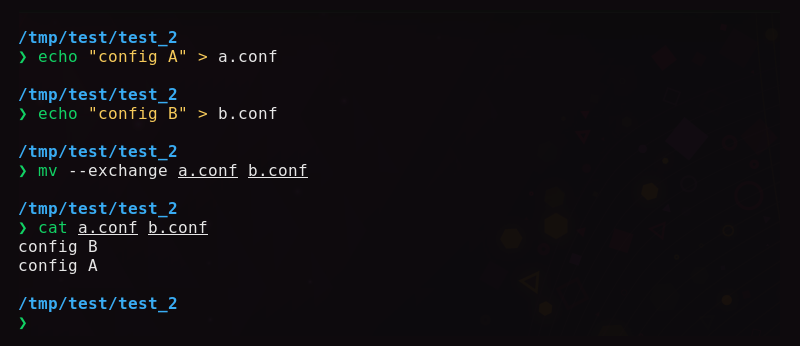
Let's create two small files to test:
echo "config A" > a.conf
echo "config B" > b.conf
Now swap them:
mv --exchange a.conf b.conf
Check the result:
cat a.conf b.conf
config B
config A
That's it. The contents traded places in one command, and no temporary file was involved.
Swap two directories (and the mistake I made)
It works for directories too, which is where it really shines. But the first time I tried it, it failed:
mkdir release-old release-new
touch release-old/v1 release-new/v2
mv --exchange release-old release-new
mv: cannot exchange 'release-old' and 'release-new/release-old': Unknown error -1
Look at the second path in the error: release-new/release-old. When the last argument is an existing directory, mv assumes you want to move things into it, just like a regular mv. So it tried to swap release-old with a path inside release-new that doesn't exist.
The fix is the -T (--no-target-directory) option, which tells mv to treat the last argument as a plain name instead of a destination folder:
mv -T --exchange release-old release-new
ls release-old release-new
release-new:
v1

release-old:
v2
Now the whole directory trees were swapped, no matter how many files they contain, because only the names changed.
Where it actually helps
Here are a few situations where I find mv --exchange useful:
- Rolling out a new configuration. Swap the new config into place and keep the old one under the other name, ready for a quick rollback with the same command.
- Switching release directories. If you deploy a new version of a site into a separate folder, you can swap it with the live folder in one step (remember the
-T). - Undoing a swap. Running the same command again swaps the files back.
Limitations you should know
mv --exchange is not magic, and a few things can trip you up.
Both paths must be on the same filesystem
The swap only works when both files live on the same filesystem. If you try to exchange a file on one filesystem with a file in a tmpfs mount like /dev/shm, the kernel refuses the operation:
mv --exchange b.conf /dev/shm/x.conf
mv: cannot exchange 'b.conf' and '/dev/shm/x.conf': Unknown error -1
The message is not very helpful (it is the same "Unknown error -1" we saw in the directory mistake above), so it's worth knowing the real reason: the kernel can't swap names across two different filesystems.
Regular mv gets around this by copying the file and deleting the original, but that can't be done atomically, so --exchange doesn't even try.

The filesystem must support it
The underlying system call needs filesystem support. Common Linux filesystems such as ext4, Btrfs, XFS and tmpfs support it.
Conclusion
mv --exchange is one of those small additions that removes a whole category of fiddly, error-prone shell work. If you are on a recent distribution like NixOS, Fedora or Debian 13, it is already on your system.
Next time you reach for a temporary file name to swap two things, try mv --exchange instead. Just remember to add -T when you swap directories.
If this helped you, consider supporting It's FOSS
It's FOSS has been helping people use Linux for the past 14 years. Help us stay independent from big tech. Become a Plus member, enjoy ad-free reading and get 5 eBooks.
Skip the AI slop and SEO spam in your Google results
Tell Google you prefer It's FOSS, and it will show our Linux news and tutorials, created by experienced Linux users, more often when you search. It takes just a click.
Set as preferred sourceGet FOSS Weekly in your inbox