


As you might already know, the AUR has been going through a rough patch, where more than 1,500 packages were compromised across three separate waves of malware attacks before Arch developers could get a handle on it.
yay, the most popular AUR helper for Arch Linux, just put out a release aimed at tackling that mess on the user level, introducing two new features that make it easier to spot a risky package before you install it and to automate the review work yourself.
Let's check it out! 🤓
New tools to spot malicious packages
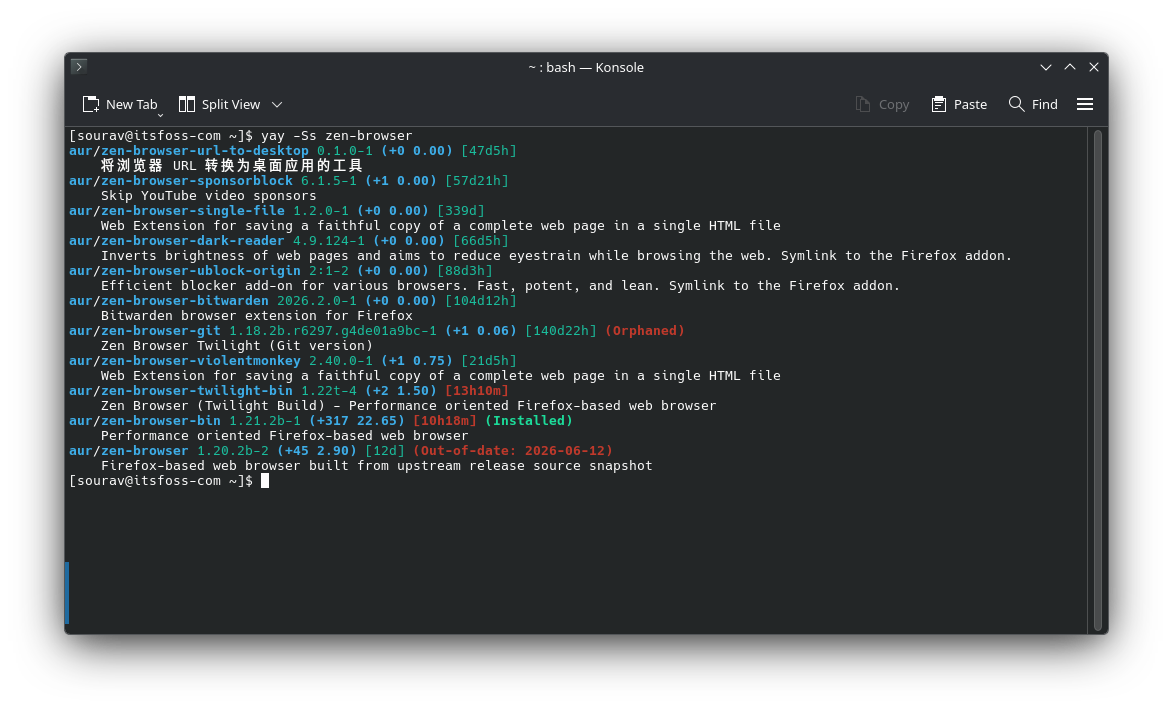
Search results, the yogurt prompt, and the upgrade menu all carry a new timestamp now, showing how long it's been since a package's PKGBUILD last changed. This gives you a heads-up on which packages might be worth a closer look before installing.
Jo Guerreiro, the maintainer of yay, clarified that the number by itself doesn't accomplish anything. Something edited last week isn't automatically dangerous, and something untouched for years isn't automatically clean.
This is meant to be just one extra signal to weigh before you commit to an install.
The other major addition here is support for Lua-based hooks and configuration, letting you script how yay behaves at different points in the install and upgrade flow. You can now drop a file at $XDG_CONFIG_HOME/yay/init.lua, usually ~/.config/yay/init.lua, and yay will pull both settings and hooks straight out of it.
Leave that file out entirely and nothing Lua-related runs at all. config.json doesn't go away either, init.lua sits above it and can override what's already there, while flags you pass on the command line take priority over everything else.
One of the new hooks, UpgradeSelect, kicks in partway through yay -Syu, once yay has worked out what needs upgrading but hasn't yet put the package exclusion screen in front of you.
Two more hooks come into play before the actual install runs, just later in the sequence than UpgradeSelect.
AURPreInstall triggers right after a PKGBUILD is fetched, early enough to abort an install before you've seen any menus. By the time makepkg --verifysource finishes pulling and checking the source, AURPostDownload fires, and at that point a script can look at the PKGBUILD next to the actual files it downloaded, still ahead of the install.
Beyond those, the v13 release also adds hooks for filtering search results and for taking action once a package finishes installing. The rest of it is mostly cleanup work like restoring missing locale files, and the ALPM executor picks up a proper log callback and a new Debug method.
You can get yay running on your Arch Linux or Arch-based setup by cloning it from the AUR and building it with makepkg:
git clone https://aur.archlinux.org/yay.git
cd yay && makepkg -si
Enjoyed this update? Support independent Linux news coverage
It's FOSS has been helping people use Linux for the past 14 years. Help us stay independent from big tech. Become a Plus member, enjoy ad-free reading and get 5 eBooks.
Skip the AI slop and SEO spam in your Google results
Tell Google you prefer It's FOSS, and it will show our Linux news and tutorials, created by experienced Linux users, more often when you search. It takes just a click.
Set as preferred sourceGet FOSS Weekly in your inbox

