


APT, or Advanced Package Tool, is the package manager on Debian and its derivatives like Ubuntu, Linux Mint, and elementary OS. On these, if you want to install something, remove it, or update the whole system, you do it via APT.
It has been around for decades, and if you are on a Debian-based distro, then you have almost certainly used it without giving it much thought. That said, it has seen active development in the last couple of years.
We covered the APT 3.0 release this time last year, which kicked off the 3.x series with a colorful new output format, the Solver3 dependency resolver, a switch from GnuTLS/GnuPG to OpenSSL, and Sequoia for cryptographic operations.
The 3.1.x cycle that followed has now closed out with APT 3.2 as the stable release, and it brings some notable changes with it.
What do you get with Apt 3.2?
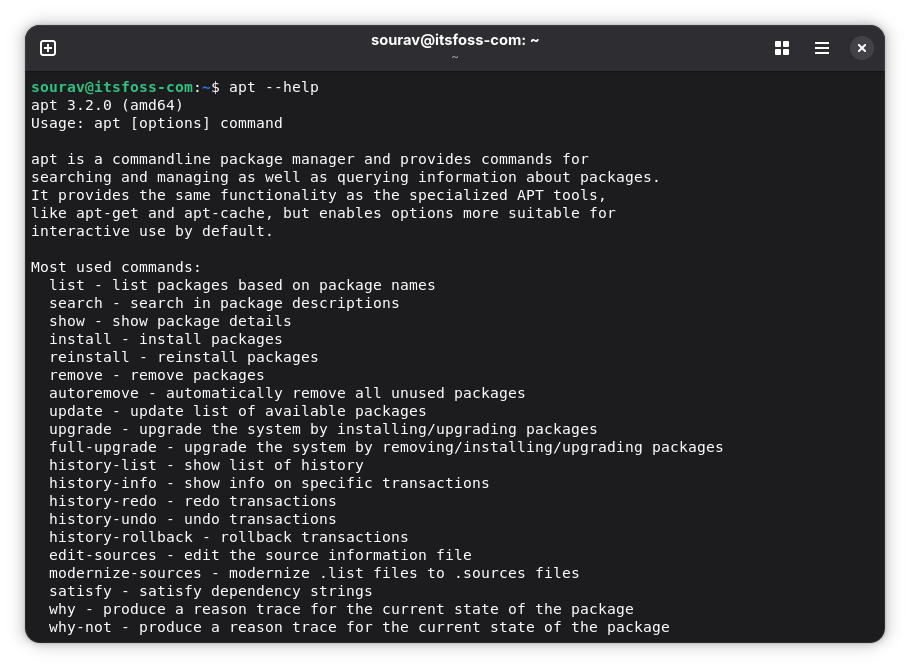
The biggest additions with this release are transaction history with rollback support, some new commands, and per-repository package filtering.
APT now keeps a log of every package install, upgrade, and removal. You can view the full list with apt history-list, which shows all past operations with an ID assigned to each. To see exactly what packages were affected in a specific operation, you can use apt history-info <ID>.
From there, apt history-undo <ID> can be used to reverse a specific operation, reinstalling removed packages or removing installed ones as needed. If you undo something mistakenly and want it back, run apt history-redo <ID> to reapply it.
For cases where you want to revert everything back to the state at a particular point, apt history-rollback <ID> does that by undoing all operations that happened after the specified ID. Use this with care, as it makes a permanent change.
apt why and apt why-not are another set of new additions that let you trace the dependency chain behind a package. Run apt why <package> and APT will tell you exactly what pulled it onto your system. Run apt why-not <package> and it will tell you why it is not installed.
Similarly, Include and Exclude are two new options that let you limit which packages APT uses from a specific repository. Include restricts a repo to only the packages you specify, and Exclude removes specific packages from a repo entirely.
Solver3, which shipped as opt-in with APT 3.0, is now on by default. It also gains the ability to upgrade packages by source package, so all binaries from the same source are upgraded together.
Additionally, your system will no longer go to sleep while dpkg is running mid-install and JSONL performance counter logging is also in, though that is mostly useful for developers.
If all of that's got you interested, then you can try Apt 3.2 on a Debian Sid installation as I did below or wait for the Ubuntu 26.04 LTS release, which is reportedly shipping it.
How to use rollback on Apt?
I almost got lost in the labyrinth of Vim, unable to exit.
After installing some new programs using APT, I tested a few commands to see how rollback and redoing transactions worked. First, I ran sudo apt history-list in the terminal and entered my password to authorize the command.
The output was a list of APT transactions that included the preparatory work I had done to switch to Debian Sid from Stable, as well as the two install commands to get Vim and Nala installed.
Next, I ran sudo apt history-info 4, the number being the ID of the transaction, and I was shown all the key details related to it, such as the start/end time, requested by which user, the command used, and packages changed.
After that, I ran sudo apt history-undo 4 to revert the Vim installation and sudo apt history-redo 4 to restore the installation; both of these commands worked as advertised.
Finally, I tested sudo apt history-rollback 3 to get rid of Nala, and the process was just about the same as before, with me being asked to confirm changes by typing "Y".
When I tried to run apt history-redo for this one, the execution failed as expected.
💬 Do these new additions look useful to you? Can't be bothered? Let me know below!

