


There is a new merge on the Wayland GitLab repo. This new merge (of an old pull request) adds xdg-session-management protocol to Wayland. This is a big development and certainly a feature Linux users will enjoy.
As per the brief message in merge request:
For a variety of cases it's desirable to have a method for negotiating the restoration of previously-used states for a client's windows. This helps for e.g., a compositor/client crashing (definitely not due to bugs) or a backgrounded client deciding to temporarily destroy its surfaces in order to conserve resources.
This protocol adds a method for managing such negotiation and is loosely based on the Enlightenment "session recovery" protocol which has been implemented and functional for roughly two years.
In simpler words, session recovery is finally coming to Wayland.
What is the xdg-session-management protocol?
Basically, it's a set of rules that is used by your desktop environment and applications for talking to each other for saving and restoring the window state.
With this fresh new protocol, written natively for Wayland, the concept of session management existed in the previous X11 display server but it is finally coming to Wayland.
If you are curious, XDG stands for Cross Desktop Group. The X could have been Xorg or X11 once upon a time. Actually, it's all under the freedesktop.org organization that creates standards that work across all desktop environments in Linux.
What kind of advantages can you expect?
I see two major benefits of the session management:
Restore your windows after a crash or restart
You'll be able to restore the previous state and size of an application. This is like the usual "do you want to restore last session" thing you see in web browsers. But this one is for all your apps and windows and works automatically.
Save the desktop layout
This will be interesting as well. Your Linux desktop will be able to remember window positions and sizes across restarts. So if you are meticulous about an organized layout where the terminal is on the left and the browser is on the right, it will be the same even after your system restarts. Note that session survives temporary app closures, too.
There is a demo of this protocol with Chromium shared in the video below:
It took 6 years, but the pull request finally got merged
If you look at the repo, you'll notice that the pull request was created on February 17, 2020. That was six years ago. The pull request was finally merged on March 23, 2026.
Linux users, or should I say Wayland users, waited so long for this feature to arrive. Note that session-management is not a new thing. If you use Xfce desktop with the classic Xorg display, it saves the session.
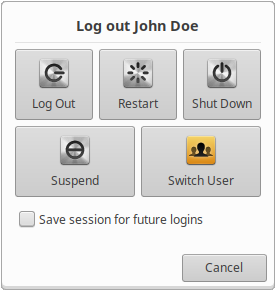
I think that KDE's KWin window manager already added this new protocol in one of the releases last year. Although I don't recall using it.
This change finally fills a gap that has existed ever since Linux distros started moving from X11 to Wayland. Session restore is now being properly implemented for the modern Wayland world. Hopefully, all desktop environments should be able to adopt it easily and Linux users get to enjoy the option of saving and restoring sessions.
