

If you have ever spent time on communities like r/unixporn, you have likely seen those breathtaking Linux desktops with vibrant color schemes, fluid animations, and perfectly styled status bars.
Lately, several of these setups are running Hyprland, the dynamic tiling Wayland Compositor that has taken the Linux world by storm.
But for a newcomer, installing Hyprland often results in a dauntingly blank black screen. Configuring Hyprland on your own is a challenge in itself.
To bridge the gap between a "vanilla" install and a masterpiece, you need dotfiles.
What are dotfiles in Linux?
In the Linux world, dotfiles are configuration files that reside in your home directory, typically starting with a dot (like .config or .zshrc), which makes them hidden by default. These files act as the "brain" of your system, telling every individual application, from your terminal emulator and status bar to the window manager itself, exactly how to look and behave.
For Hyprland, dotfiles control everything from the thickness of your window borders to the speed of your workspace animations.
While you could spend weeks learning the syntax to write these configurations from scratch, the open-source community is famous for "sharing the wealth." Customization experts bundle their entire desktop environments into repositories on GitHub.
By using these community dotfiles, you aren't just copying a look; you are inheriting a carefully curated ecosystem of scripts, shortcuts, and custom widgets that would take months to build alone.
However, not all dotfiles are created equal. Some are designed for extreme minimalism, while others are feature-packed "Desktop Environment" replacements that include automated installers and GUI settings menus.
In this article, I’ve put together 10 of the best Hyprland setups you can find. Whether you need something clean and simple for work or a flashy, glowing desktop that looks like it’s from the future, you’ll find the perfect starting point here.
1. ML4W (My Linux 4 Work)

Stephan Raabe’s ML4W dotfiles are the gold standard for anyone who wants a "ready-to-work" professional environment without the headache of manual configuration. It’s more than just a setup; it’s a full-featured desktop experience built on top of Hyprland, designed to be stable, beautiful, and incredibly easy to manage.
🔑 Key features
- Global Theme Support: You can now open a theme selector instantly by pressing
CTRL+ALT+T. - The "Glass" Aesthetic: The latest update introduces a beautiful Global Glass theme and a new Glass Center Waybar layout that places the workspace selector right in the middle for better symmetry.
- Dynamic Theming: It uses adaptive material color schemes that automatically change your system’s colors to match your current wallpaper.
- Installer Support: It features a robust Dotfiles Installer with setup scripts that handle all dependencies for Arch Linux and openSUSE, with support for Fedora as well.
This is a dedicated graphical interface that lets you customize your desktop (like window borders, animations, and blur) through simple toggles rather than editing complex code.
2. JaKooLit
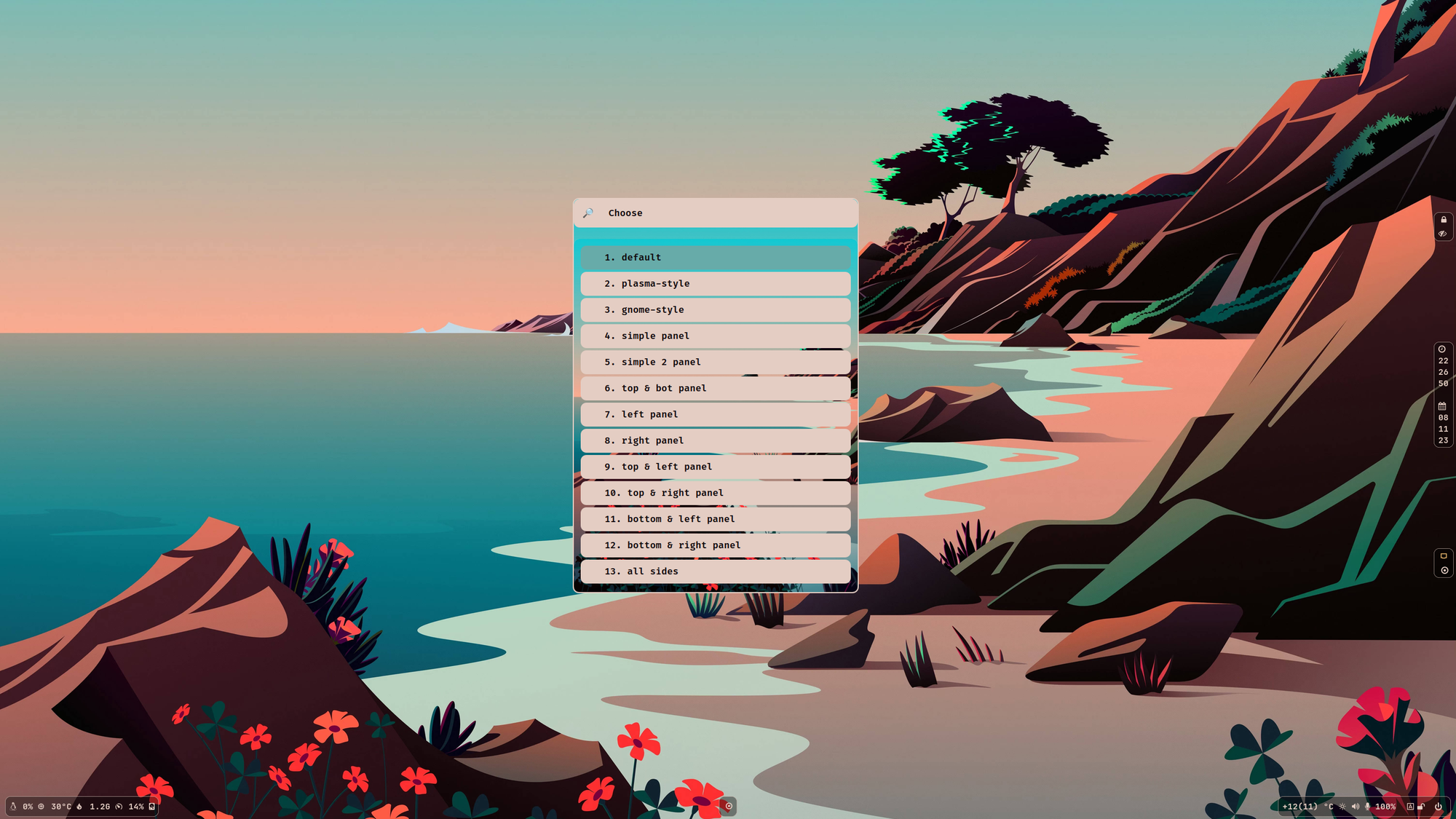
JaKooLit is the community's favorite "all-in-one" solution. While many dotfiles are strictly for Arch Linux, JaKooLit famously provides support for Fedora, Ubuntu, and even Debian, making it a lifesaver for people who want the Hyprland aesthetic on their favorite stable distro.
🔑 Key features
- Neon Circuit Style: The default Waybar has been updated to the "Neon Circuit", which looks perfect for that classic Cyberpunk aesthetic.
- Quickshell Integration: It now features a stunning "Overview" (an alternative to AGS) that gives you a smartphone-style control center for your desktop.
- Smart Battery Info: If you’re on a laptop, your lock screen (Hyprlock) now shows live battery stats so you aren’t caught off guard.
- New Keybinds: New shortcuts (F9–F12) allow you to quickly move workspaces between different monitors, which is a game-changer for multi-monitor setups.
3. HyDE
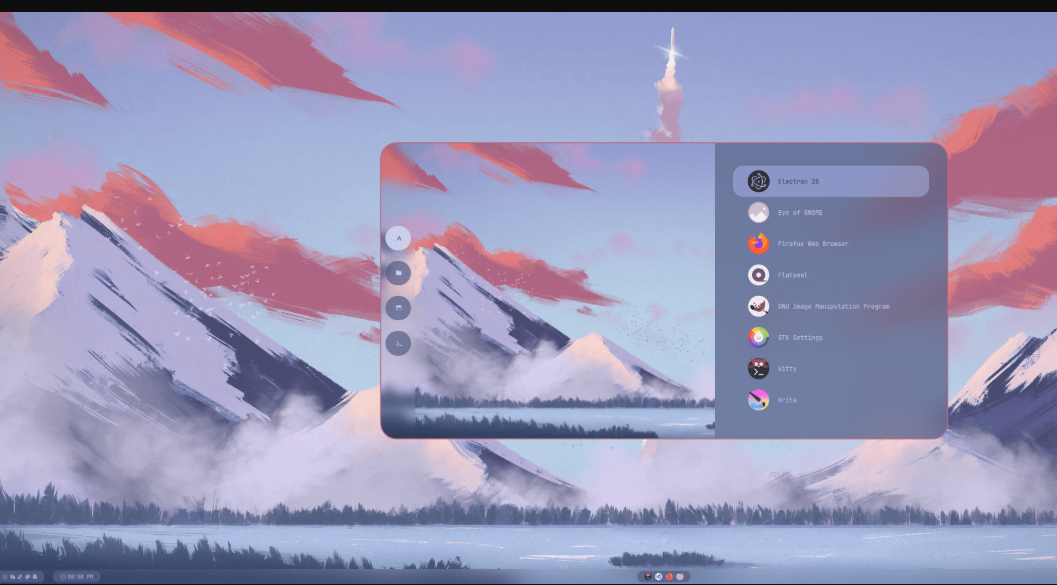
If you love a terminal-centric workflow but still want your desktop to look like a piece of modern art, HyDE (formerly known as Hyprdots) is likely your perfect match.
It’s built with a modular "XDG-compliant" structure, which is a fancy way of saying it keeps its core scripts separate from your personal settings, making it much harder to break things when you update.
HyDE is primarily Arch-centric. The automated installer is designed for a minimal Arch Linux base, but it works flawlessly on Arch-based distros like EndeavourOS, CachyOS, or Manjaro. For the NixOS crowd, there is a separate experimental project called HydeNix.
🔑 Key features
- Explicit Font Tuning: The latest updates added specific font configurations for QT and GTK apps, ensuring that your text looks crisp and consistent across different types of software.
- Audio Engine Shift: They've moved from
pamixertowpctlfor volume control. This is a big win for reliability if you're using PipeWire (the modern Linux audio standard). - Fish Shell Improvements: If you’re a Fish user, the config has been moved to a cleaner
conf.dstructure. This makes it easier for you to add your own aliases and functions inconfig.fishwithout cluttering the system's core settings. - OCR (Text Recognition). You can essentially take a screenshot of any text on your screen (even in an image or a video), and HyDE will turn it into editable text for your clipboard.
Super+Shift+T, you can open a community gallery to browse and apply dozens of themes instantly. It doesn't just change the wallpaper; it re-themes your bar, launcher, and even your terminal colors to match.4. End-4 (Illogical Impulse)
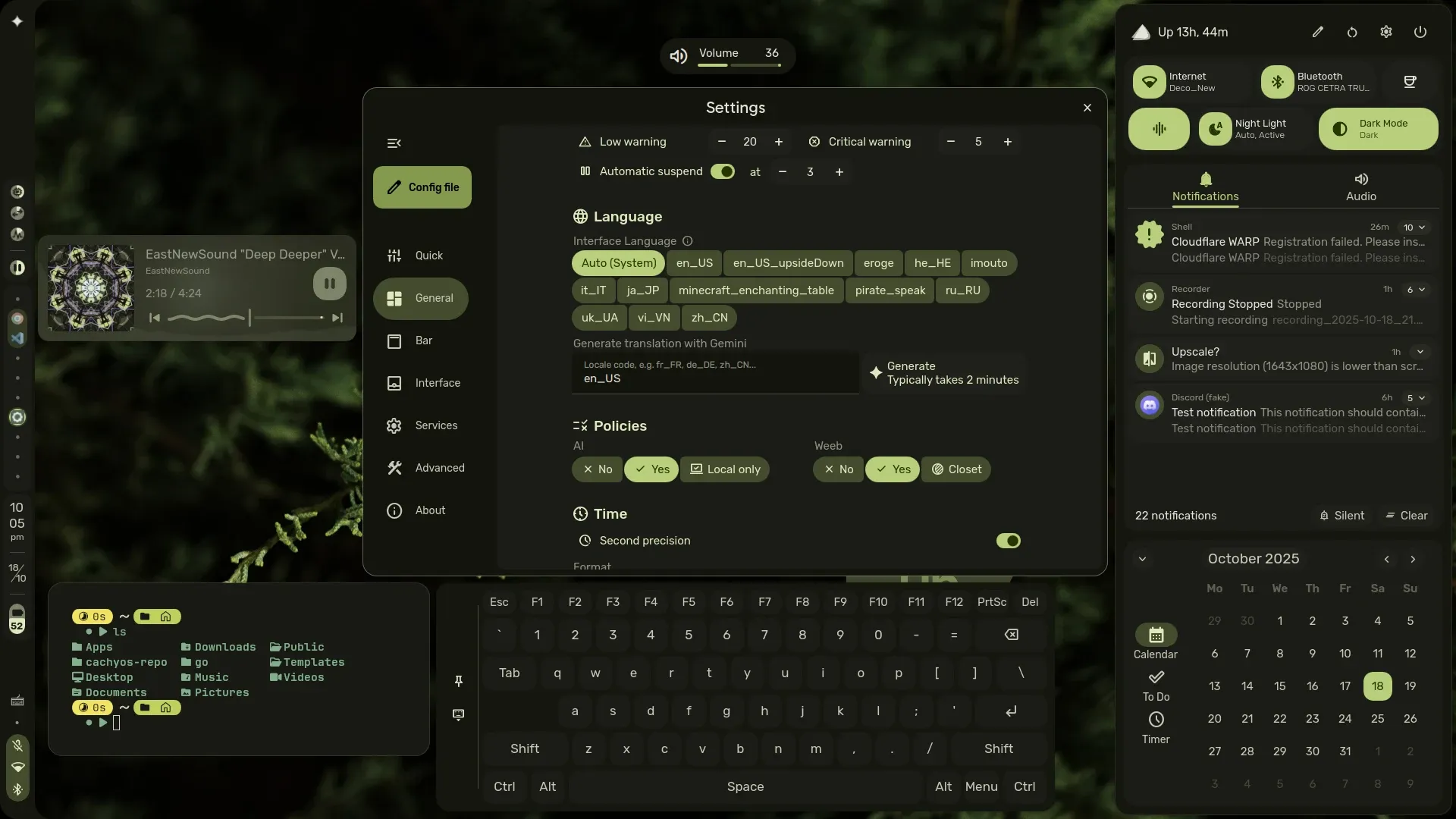
If you want your Linux desktop to look like a futuristic sci-fi interface from a high-budget movie, End-4’s "Illogical Impulse" is the perfect choice. It’s widely considered one of the most visually stunning "rices" in the Linux world, blending smooth animations with a design language inspired by Material Design 3 and Windows 11.
This setup is a dream for Arch Linux and EndeavourOS users. While it is primarily built for the Arch ecosystem, the community has created a Fedora-specific fork.
🔑 Key features
- Material Colors: The system automatically picks colors from your wallpaper to theme your entire desktop, ensuring a perfect aesthetic match every time you change your background.
- Quickshell Revolution: End-4 has moved away from Waybar entirely. It now uses Quickshell for everything, the bar, the sidebars, and the widgets, which allows for much more complex and fluid animations that feel more like a mobile OS.
- Visual Overview: Pressing
Super+Tablaunches a gorgeous "Overview" screen where you can see live previews of your open apps and drag them between workspaces.
5. Caelestia Shell

If you are a fan of the "Material You" design language seen on modern Android devices, the Caelestia Shell is easily the best choice. It moves away from the traditional dark, "gritty" look of many Linux setups and instead focuses on soft pastel colors, rounded corners, and a unified design that feels incredibly welcoming.
Caelestia is a favorite among Arch Linux and CachyOS users (there’s even a dedicated AUR package called caelestia-meta). However, it has recently gained significant traction in the NixOS community thanks to its modular Flake support.
🔑 Key features
- Rotation Options: A new feature for the active window allows you to rotate window layouts counter-clockwise, which is great for vertical monitor setups.
- Desktop Clock Enhancements: The latest v1.3.4 update refined the desktop clock fonts and fixed scaling issues for high-resolution monitors.
- Smarter Battery Monitoring: The toast notifications for your charger (plugged/unplugged) have been polished to look more like a native mobile OS.
- Material Color Engine: This intelligently picks colors from your wallpaper and applies them to every single widget, creating a cohesive theme that feels "baked-in" rather than slapped on.
6. Nik Singh (Gdots)
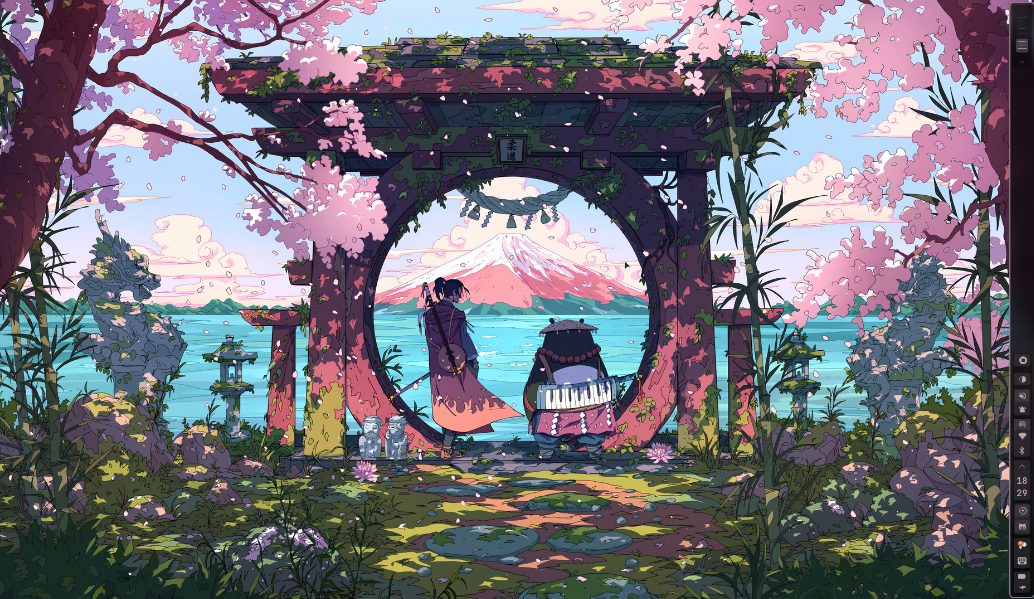
If you are looking for a Hyprland setup that feels like a full-featured "Graphical Interface" rather than just a window manager, Gdots is the perfect choice. It is designed to be accessible and friendly, making it one of the best bridges for users moving away from traditional desktop environments like GNOME or KDE.
Gdots is built specifically for Arch Linux. It relies heavily on the AUR and specific Arch-based tools, though users of Arch-based distros like EndeavourOS will find it works just as smoothly.
🔑 Key features
- ShyFox Integration: It includes a pre-configured version of the ShyFox theme for Firefox, which features floating tabs and a clean, compact URL bar.
- Hyprshade & Batify: The setup now integrates
hyprshadefor screen shaders (like blue-light filters) andbatifyfor better battery notifications on mobile devices. - Hindi Devnagri Support: The developer recently updated the Waybar look to include Hindi Devnagri characters, adding a unique cultural flair.
- Smart Waybar Toggles. You can instantly refresh or toggle your status bar with
Super+B. Additionally, the window opacity can be toggled on the fly usingSuper+Shift+O, giving you instant focus when you need it.
7. Arch Eclipse
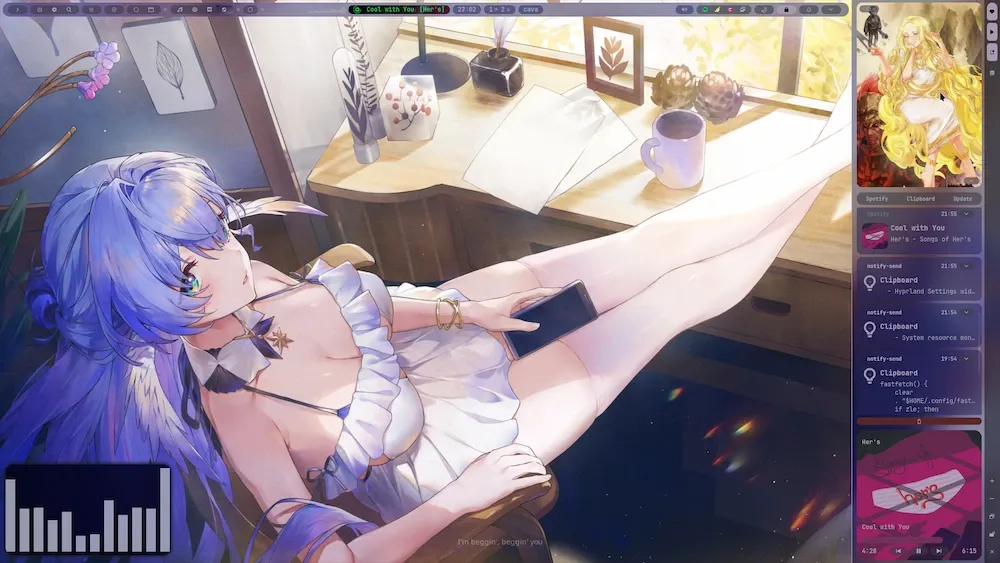
If you are a power user who treats your desktop like a command center for coding, gaming, and trading, Arch Eclipse by Ayman Lyesri is built specifically for you. It is a "daily driver" configuration that prioritizes speed and extreme functionality, recently undergoing a massive overhaul to use the cutting-edge AGS V3 (GTK 4) widget system.
Strictly Arch Linux. The developer emphasizes the "I use Arch BTW" philosophy, and while it's highly polished, it is built to leverage the Arch ecosystem to its fullest.
🔑 Key features
- Workspace-Specific Wallpapers: It features a unique system where your wallpaper can change dynamically based on which workspace you are currently in.
- AGS V3 Migration: The entire widget system was recently refactored from Eww/AGS V2 to AGS V3 (GTK 4). This means smoother animations, lower resource usage, and more modular code.
- Smart Launcher: The replaced Rofi launcher now handles arithmetic (math), emojis, and URL forwarding directly from the search bar.
- Specialized Layout: This is one of the few popular dotfile sets designed with the Dvorak keyboard layout in mind, making it a rare gem for ergonomic typing enthusiasts.
8. Colorshell
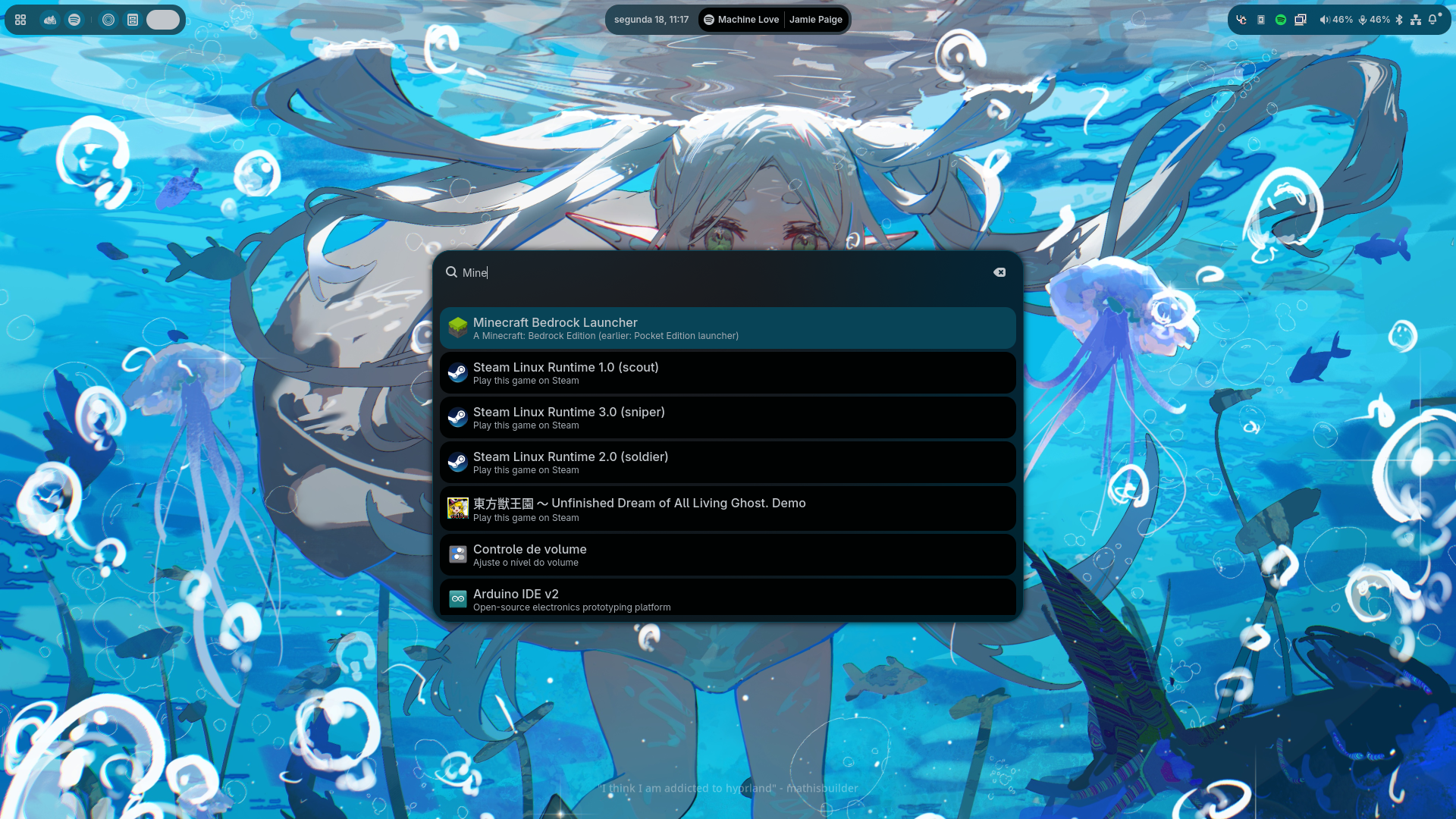
Colorshell feels less like a collection of scripts and more like a cohesive, engineered Desktop Shell. Built with TypeScript and GTK4 using the AGS (Aylur's GTK Shell) and Astal libraries, this project delivers a highly responsive and modern interface that feels incredibly premium.
Colorshell offers first-class support for both Arch Linux and NixOS. It includes a dedicated Nix Flake, making it one of the cleanest installs for Nix users, while Arch users can utilize a simple install script.
🔑 Key features
- UWSM Integration: It dynamically supports the Universal Wayland Session Manager (UWSM), ensuring apps launch with the correct environment variables.
- TypeScript & GTK4 Refactor: The shell has been recently updated for better modularity, utilizing the latest Astal libraries for faster performance.
- Application Runner with Support for Plugins: Its "Anyrun-style" launcher is more than a search bar; it's a plugin-powered command center using simple prefixes. You can use
!(Shell) to run shell commands directly using your user shell,>(Clipboard) to instantly search through your clipboard history. - Theming: It uses Pywal16 to dynamically generate the entire shell's color palette from your wallpaper, ensuring your bar, widgets, and menus are always in perfect shape.
9. sh1zicus Hyprland
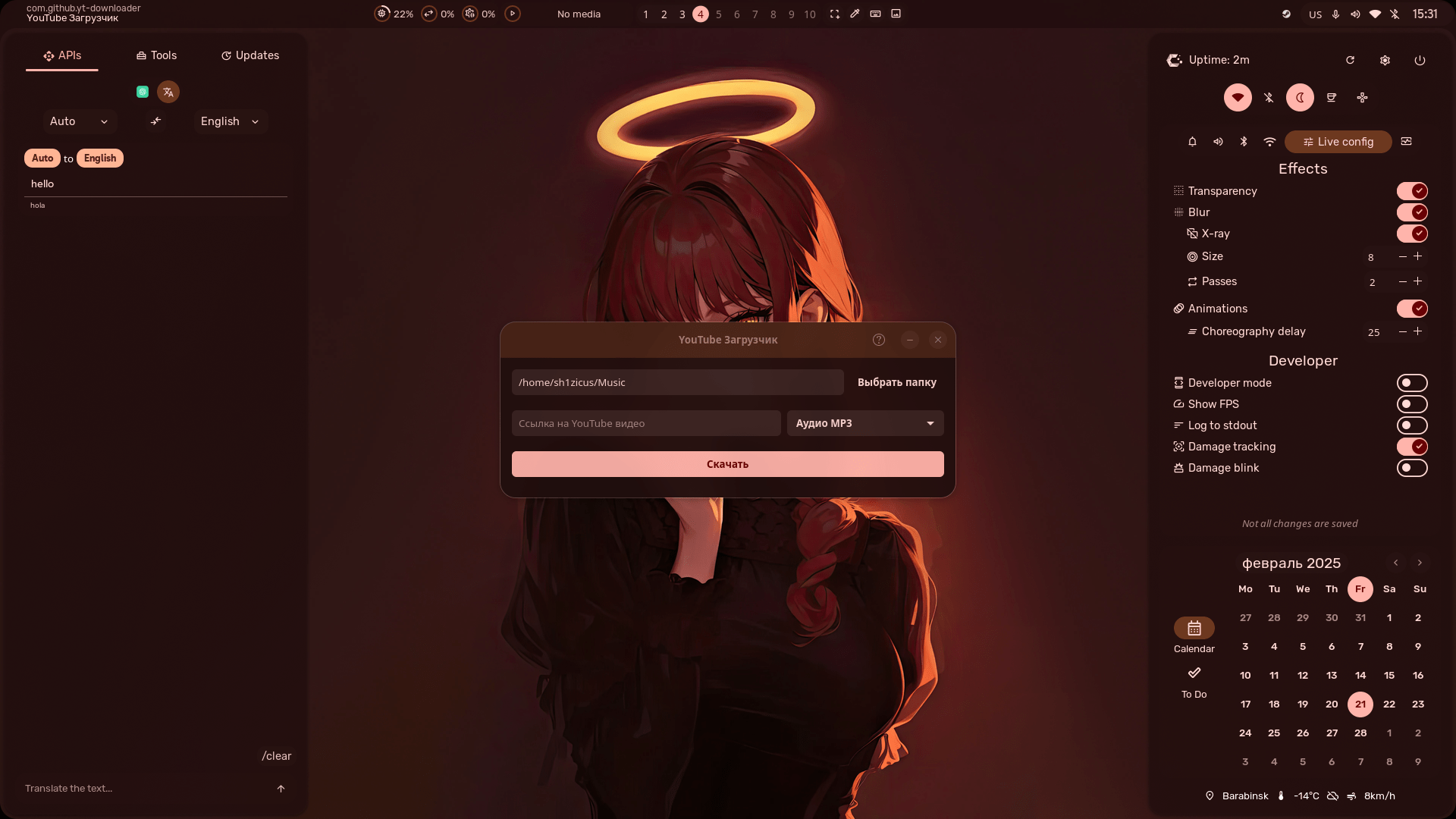
sh1zicus offers one of the most technologically integrated setups available. It is a fork of the famous Illogical Impulse (End-4), but it focuses heavily on bringing Artificial Intelligence and Material Design 3 directly into your workflow.
It is primarily Arch Linux with a guided, transparent installer. However, it is one of the few projects that provides a comprehensive Manual Wiki for users on other distributions who want to port the features over.
🔑 Key features
- Material You Color Engine: Uses an advanced color generation system that doesn't just pick one color from your wallpaper, but generates a full Material Design 3 palette (Primary, Secondary, and Tertiary accents) for a professional, coordinated look.
- Overview Widget: A redesigned "Mac-style" overview that shows all open applications and allows you to search, calculate, or run commands in one smooth motion.
- Synced Bluetooth Toggles: A recent fix (late 2024/2025) ensures the Bluetooth UI state is perfectly synced with physical device connection status, a common pain point in other Hyprland rices.
- Specialized Tools: It includes a custom Timer Manager application and a unique Emacs Material Theme in the "Extras" folder for users who want their text editor to match their OS perfectly.
10. Rainz’s Hyprland
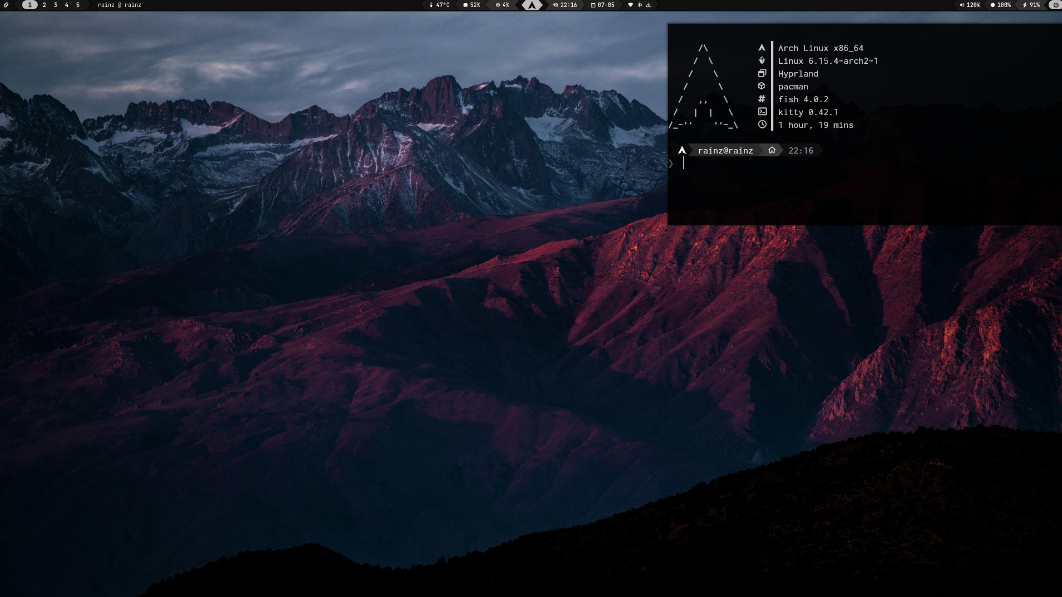
If you are a fan of the Zen Browser and want a desktop that matches that aesthetic, Rainz’s Dotfiles are a standout choice. This setup is built for users who want a dark, "cosmic" vibe that feels cohesive and easy on the eyes during long sessions.
Strictly Arch Linux. It is a "meticulously crafted" experience designed for the rolling-release ecosystem, utilizing the Fish shell and Oh My Posh for a beautiful terminal prompt.
🔑 Key features
- GPU-Accelerated Performance: Uses Kitty terminal with specific optimizations to ensure that even with heavy transparency and blur effects, your terminal input remains lag-free.
- "Silent" SDDM Theme: Includes a custom-branded login screen theme that provides a seamless visual transition from the moment you boot your PC to the moment you hit the desktop.
- Tiling & Floating Modes: Windows tile automatically to fill the screen, but "Easy Switching" lets you instantly toggle windows into floating mode, perfect for small tools like calculators or music players.
- Workspace Management: Uses smooth, Bezier curve-based animations. Transitions feel natural and fluid, providing a clear spatial sense of your apps rather than abrupt screen flickers.
- Custom Gaps & Borders: Features adjustable "breathing room" between windows and screen edges. Active windows are highlighted by a glowing "Nebula" gradient border, making it easy to identify your current focus.
- Reliable Screen Sharing: Includes pre-configured
xdg-desktop-portal-hyprland, enabling seamless screen and window sharing in Discord, Zoom, and OBS with a native, user-friendly picker.
Wrapping Up
By the way, we at It's FOSS have also shared some dot files for you. They relate to Fastfetch, Starship and KDE. The collection will grow more in 2026.
 itsfoss
The Hyprland ecosystem has matured significantly. We are no longer just looking at 'text files', these projects are complete desktop shells that outclass macOS in polish. Whether you want the AI-powered efficiency of sh1zicus or the professional stability of ML4W, there is a Hyprland setup tailored specifically for your workflow."
Share your favorite Hyprland config in the comments, please.
Christmas is the time for gifting. If you think It's FOSS is doing a great work, please support us by opting for a Plus membership. You also get 5 eBooks on Linux, Docker and Bash scripting.
Our lifetime membership option is available for $89 (instead of $149). This special price is applicable till 31st December only.
